The PDF editor SDK for Flutter
A Flutter PDF editor: one Dart API over the native iOS and Android editors. Your users edit the text already in the PDF, fill and build forms, mark up and sign — in your Flutter app.
dependencies:
  pdf_editor:
    path: vendor/pdf_editor   # comes with your license
await PdfEditor.setLicenseKey('PE1.eyJ2Ijox…');
final String? edited = await PdfEditor.open(
path: file.path,
mode: PdfEditorMode.annotate, // optional
);Everything your users need, in your Flutter app.
Change the text already in the PDF, in any script — its font, size and colour — then move, rotate or restack it.
Fill in existing forms, or add text fields, checkboxes, radio groups and dropdowns of your own.
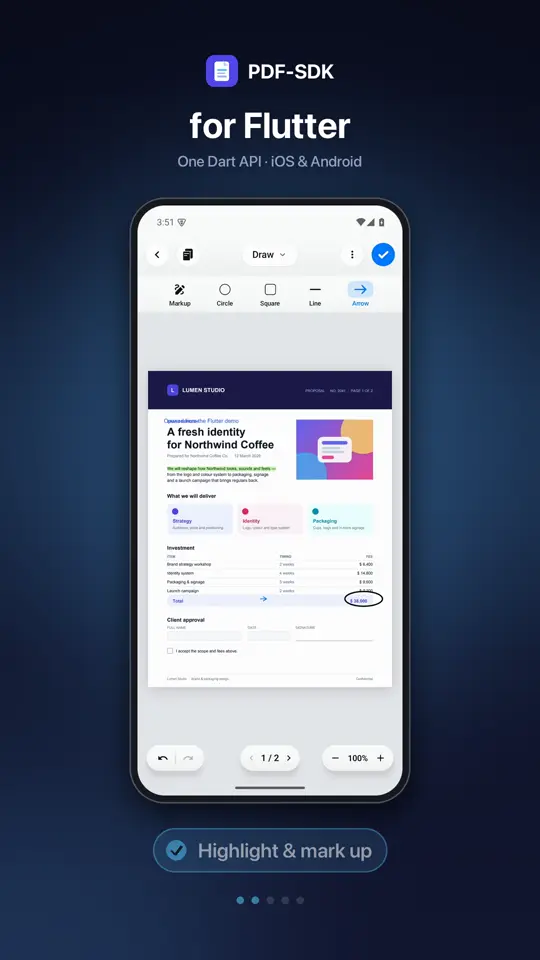
Highlight, draw and stamp, with the tools, colours and defaults you choose.
Handwritten signatures, digital signatures with a digital ID, and verification of the ones already there.
Insert and reorder pages, import them from other PDFs and extract them into new ones.
Change the text already in the PDF, in any script — its font, size and colour — then move, rotate or restack it.
See the Flutter PDF editor in action.
One Dart API for iOS and Android, with the same editor on both.
- Edit text and images
- Highlight and mark up
- Add shapes and arrows
- Fill in forms
- Sign anywhere
Built for Flutter.
Native on both platforms
The plugin opens the native iOS and Android editors, so documents look and behave the same as in a native app.
One Dart API
Open a file, get the edited file back. Choose the mode and tool to open in.
Make it yours
Choose modes and tools, hide menu items, rename them, set the colour scheme, selection colour and handle shape.
Edit from code
A document API reads and replaces text, adds text and saves — with or without the editor on screen.
Localized
Set the editor’s language and replace any of its strings.
Requirements
- Flutter
- 3.44 or later (tested on 3.47), with Swift Package Manager enabled
- iOS
- 15 or later
- Android
- 8.0 (API 26) or later, arm64-v8a devices
- Install with
- The plugin that comes with your license
Add the Flutter PDF editor in three steps.
- 1
Add the plugin
The pdf_editor plugin comes with your license as a folder or a Git repository. Add it to pubspec.yaml and turn on Swift Package Manager for iOS.
- 2
Set your license key
Once, before the first editor; main() is the natural place. The key lists your iOS bundle identifier and Android package name.
- 3
Open the editor
Call PdfEditor.open with a PDF on disk. It resolves with the path of the edited file, or null if the user closed without saving.
Flutter questions.
Native: the plugin opens the PDF-SDK editors for iOS and Android, so there is no web view.
Flutter 3.44 or later (tested on 3.47) with Swift Package Manager enabled, for iOS 15+ and Android 8.0 (API 26)+.
Yes. The document API reads and replaces text, adds text and saves the result.
The same editor on other platforms
Try it in your app.
A free trial unlocks every feature on every platform, in any app. Open a document today.
Talk to us
Questions about licensing, several apps, volume, or OEM and site terms — we will work out what fits.