The PDF editor SDK for iOS and iPadOS
A native iOS PDF SDK for SwiftUI and UIKit apps. Your users edit the text already in the PDF, fill and build forms, mark up, sign and verify — on iPhone, iPad and the Mac.
dependencies: [
    .package(url: "<your PDF-SDK package URL>", from: "2.4.1"),
],
targets: [
    .target(name: "MyApp", dependencies: [
        .product(name: "PDFEditorUI", package: "pdf-sdk"),
    ]),
]
import SwiftUI
import PDFEditorUI
@main
struct MyApp: App {
init() { PDFEditorSDK.setLicenseKey("PE1.eyJ2Ijox…") }
var body: some Scene { WindowGroup { ContentView() } }
}
// Present the editor; the edited PDF comes back as Data.
PDFEditorView(url: pdfURL) { edited in
try? edited.write(to: pdfURL, options: .atomic)
} onCancel: { }Everything your users need, in your iOS app.
Change the text already in the PDF, in any script — its font, size and colour — then move, rotate or restack it.
Fill in existing forms, or add text fields, checkboxes, radio groups and dropdowns of your own.
Highlight, draw and stamp, with the tools, colours and defaults you choose.
Handwritten signatures, digital signatures with a digital ID, and verification of the ones already there.
Insert and reorder pages, import them from other PDFs and extract them into new ones.
Change the text already in the PDF, in any script — its font, size and colour — then move, rotate or restack it.
See the iOS PDF editor in action.
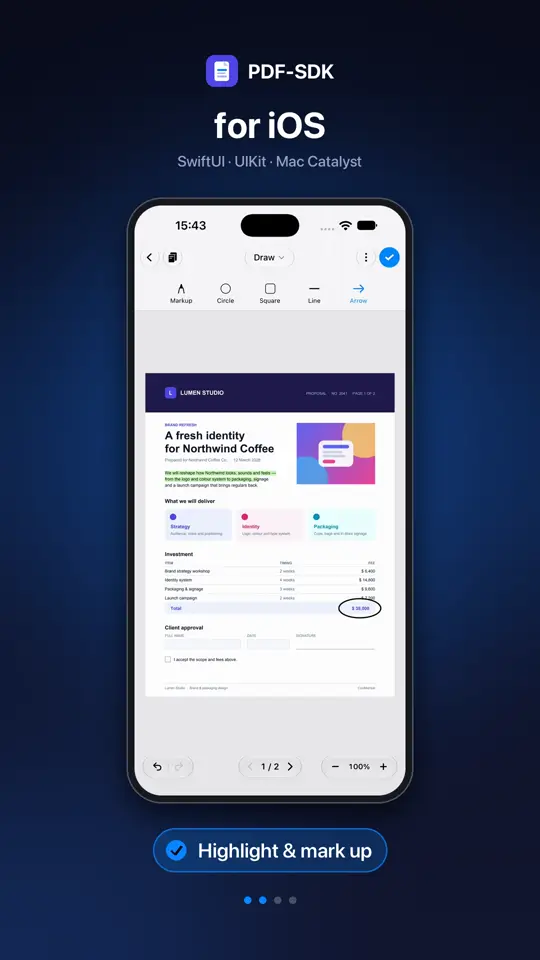
The full editor inside a SwiftUI or UIKit app, shown here on iPhone.
- Edit text and images
- Highlight and mark up
- Add shapes and arrows
- Fill in forms
Built for iOS.
SwiftUI and UIKit
Present the editor as a SwiftUI view or from UIKit. You get the edited PDF back as Data.
iPhone, iPad and Mac
The same product runs on iPad and, through Mac Catalyst, on the Mac — one code base.
Swift Package Manager
Add one Swift package. Nothing else to install, and no CocoaPods.
Make it yours
Choose the modes and tools, rename, reorder or re-icon them, add your own buttons, set fonts and the selection style.
Edit from code
A document API makes the same kinds of edits without the editor — read and replace text, add content, fill forms.
Digital signatures
Sign with a digital ID and verify the signatures already in a document.
Requirements
- iOS and iPadOS
- 15 or later
- Mac Catalyst
- 15 or later
- UI
- SwiftUI or UIKit
- Install with
- Swift Package Manager
Add a Swift PDF editor in three steps.
- 1
Add the Swift package
In Xcode, choose Add Package Dependencies, enter the package URL that comes with your license, and add the PDFEditorUI product to your app target.
- 2
Set your license key
Once at launch, before the first editor opens. The key must list your app’s bundle identifier.
- 3
Present the editor
Use PDFEditorView in SwiftUI or PDFEditorViewController in UIKit. Give it a PDF file and get the edited bytes back.
iOS questions.
Yes. Present the editor as a SwiftUI view; UIKit apps present it from a view controller. Either way the edited PDF comes back as Data.
iOS and iPadOS 15 or later, and Mac Catalyst 15 or later.
No. PDF-SDK ships as a Swift package — add it with Swift Package Manager.
The same editor on other platforms
Try it in your app.
A free trial unlocks every feature on every platform, in any app. Open a document today.
Talk to us
Questions about licensing, several apps, volume, or OEM and site terms — we will work out what fits.